Features

Bright and Contrast Adjustments in Invert Mode

2y agoCompleted

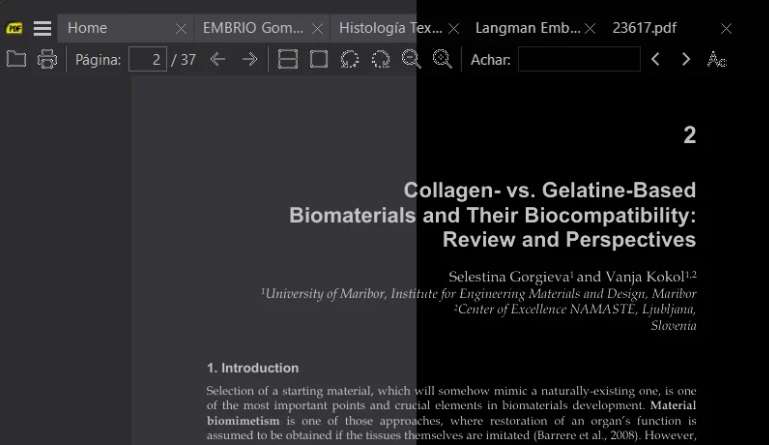
The invert mode is great for reading in the dark, but it is still 'too bright' for long readings sessions. Adjust the bright and contrast can really reduce the eye stress.

  • img/uydmmifwe8liq46dkernope7
and 2 others

5 comments

  1. Krzysztof Kowalczyk marked this as Completed17d ago
  2. Implemented in 3.7, available in the pre-release: https://www.sumatrapdfreader.org/prerelease

    Ctrl+K → Adjust Brightness... (or Adjust Contrast...) opens brightness and contrast sliders with a live preview, remembered per document.

    1. Anonymous17d ago

      Awesome.

      Since you answer me. I'm using IA to code some tools I needed, based on Sumatra code. Not planning on spread or anything. This contrast was one of them.

      Another ones I made these pasts months: 1. Arch tools for measuring arquitecture technical drawing on pdf 2. A system that temporary split two columns documents for continuous reading 3. Autoscroll with controls and ETA 4. A tool for temporary remove white space on top and botton of the page (better autoscroll using) 5. Flashcards system based on pdf native highlights 6. Auto sync sessions remembering groups of books 7. Reading and flashcards measuring with graph 8. Image editing 9. Correction on incremental saving Some of them are on tests and need adjustments, etc.

      You can check on: https://github.com/FelipeTesta/TumatraPDF/releases/

      I'm not dev, so maybe there will be some sloppy in there. Still using Sumatra as my main pdf reader.

      Tell me if u found something usefull. ☺️

    2. Thanks, I"ve ported many of your changes to SumatraPDF, those that are of general interest.

  3. K J2y ago

    there is no bright and dark in word processors / document viewers like notepad, etc it is a function of Hardware. What you can do is use a lesser range of colour or inverted and SumatraPDF had that setting decades ago.

    Just set your range from 101010 to EFEFEF

    1. I found the pre-release version has the 'dark' theme and inversion I wanted.