Jun 21
activate preview after installation
Pending
just tested it on an old laptop with sumatrapdf 3.3.3. opened cmd => winget upgrade sumatrapdf (very fast install), then somehow the files will open automatically with edge (?) before winget upgrade sumatrapdf it was sumatrapdf 3.3.3. now i can sumatrapdf 3.4.6 and i set windows 10 to open every pdf file with sumatrapdf from winget and it works. also i can see a preview on explorer and desktop. so for the future on a brand new computer, first i will install sumatrapdf manually with preview, then with winget upgrade (maybe i have to switch from edge to sumatra again).
it has to be cmd => winget upgrade with admin rights!
a solution would be using UniGetUI with "interactive installation". there you can select all the options that has to be activated. however it's only important on the first run. very update won't change activated file preview in windows explorer.
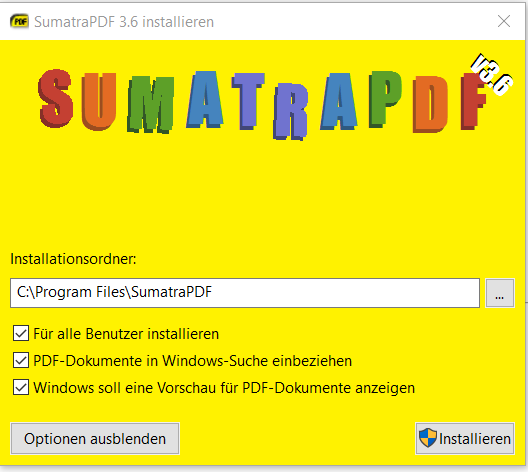
there is a problem with cmd => winget install sumatrapdf. first of all it has to be as administrator (my other programs like libreoffice, anydesk, didn't need it so far) and secondly, it doesn't install sumatrapdf with preview option https://forum.sumatrapdfreader.org/t/no-preview-in-windows-e… before winget, i could have install sumatrapdf with preview when i activate [X] Let Windows show preview of PDF documents. but if i install it manually, activate the preview and THEN winget upgrade, preview is still on